Automated Type Creation
Distributed with the repository is TypeGenerator: a proof-of-concept utility which automates much of the process of creating type signatures and servlets.
| Caution |
This tool has not been sufficiently tested, and may crash or produce buggy output. |
TypeGenerator can be run using the following command. This assumes the repository jar file is in your java classpath.
jre net.cnri.adore.TypeGenerator.UIFrame
The screen capture below shows the main window for TypeGenerator.
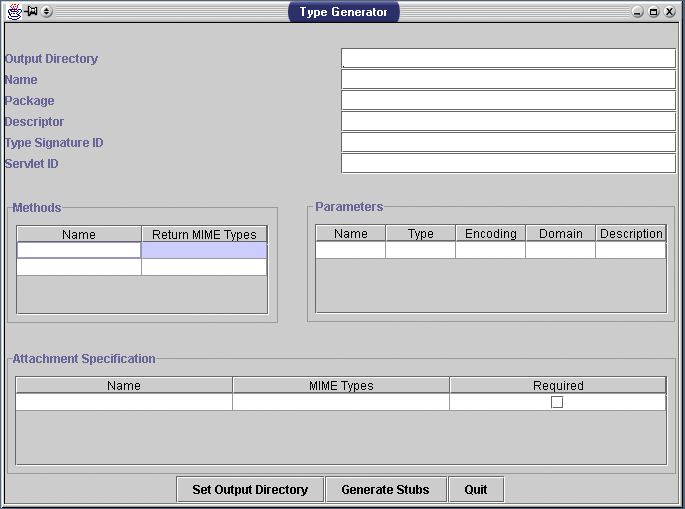
Filling out the text fields
The field Output Directory simply specifies the path to save the generated output files to. This location can be also be set by clicking the button marked Set Output Directory.
The field name should be filled in with a valid Java class name which is descriptive of this type.
If the generated classes belong in a particular java package path, enter it in the package field. Otherwise, it can be left blank.
The descriptor field should contain a user-readable description of this type.
The registered ID's for the servlet and signature should be entered into the Servlet ID and TypeSignatureID fields.
Defining Methods
Any visible methods this type should be entered into the Methods table. For each method, enter a valid Java method name, and a comma delimited list of all the MIME types it could possibly return. The adjacent Parameters table reflects the parameters to be passed to the selected entry in the Method table. The Name column should contain a valid Java variable name. The Type column denotes the Java Standard Library Class this parameter will accept. "Integer", "String", "Float", "Byte", "Character", "Long", and "Short" are possible values for this field. Note that Java primitive types are not supported. The domain and encoding columns correspond to the encoding and value attributes of the Domain class.
Specifying Attachments
Use the Attachment Specification table to list types of attachments the servlet should support. The Name column should contain the name of the attachment. The MIME Types column accepts a comma-delimited list of MIME Types that are valid for this attachment. The Required check box specifies whether or not this attachment is mandatory.
Finishing Up
Once all the data is filled in properly, the Generate Stubs button can be pressed to create the servlet and type signature source files.
After they are created, the servlet source file should be edited. Any of the methods specified in the Methods table should have their bodies filled in, as only stubs will be present in the source. From within these method, datastreams can be accessed using the GetStreamsFromPlug(String plugname) method. The parameter plugname specifies the name of the attachment to return. The datastream will be returned in the form of a MIMETypedStream array.
The type signature and servlet should now be complete. The final step is to compile the classes, and install.